Selectors and the cascade
Selectors match model entities. They resemble CSS selectors, but MGL has its own matching rules and specificity.
Selector forms
| Selector | Matches |
|---|---|
node | All nodes, including containers |
edge | All relations |
title-block | The title block |
node api | The node with ID api |
edge request | The explicitly identified relation request |
api | Nodes and explicitly identified relations with ID api |
node scoped::api | A node selected using a qualified ID |
node[role] | Nodes with a role attribute |
node[role = service] | Nodes whose role equals service |
node[role != service] | Nodes with a role attribute whose value differs from service |
node[mgl::container] | Container nodes |
Predicates may also be applied to edge and ID selectors. Adjacent predicates
have AND semantics; comma-separated complete selectors have OR semantics.
A missing attribute does not satisfy !=.
Use = rather than ==. Quote values that contain spaces or operators. Namespace-qualified
attribute names are supported. Predicates on title-block do not match.
A bare ID that matches both nodes and relations produces an ambiguity warning
and applies to both. Prefer typed IDs when the distinction matters. Endpoint
expressions such as api -> database are not supported as selectors.
Specificity
Each ID contributes 100, each predicate contributes 10, and a plain domain contributes 0 to specificity. Higher specificity wins. For equal specificity, the later rule wins, including across stylesheets applied by a view.
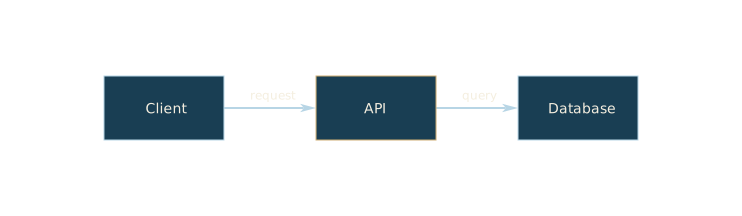
In this example, api has the role: service attribute. Its ID rule overrides
the matching attribute rule, giving it a brass outline. The client keeps the
general blue outline.
model system {
  client [Client]
  api [API] {
    role: service
  }
  database [Database]
  request: client -> api [request]
  query: api -> database [query]
}

stylesheet blueprint {
  node {
    fill: #193e53
    stroke: #b7d5e5
    color: #f4eedf
  }
  node[role = service] {
    stroke: #9cb5a5
  }
  node api {
    stroke: #cfad72
  }
  edge {
    stroke: #b7d5e5
    color: #f4eedf
  }
}

view overview {
  use model system
  use stylesheet blueprint
}
CSS classes, #id, wildcard selectors, hierarchy combinators, and pseudo-selectors
are not supported.